
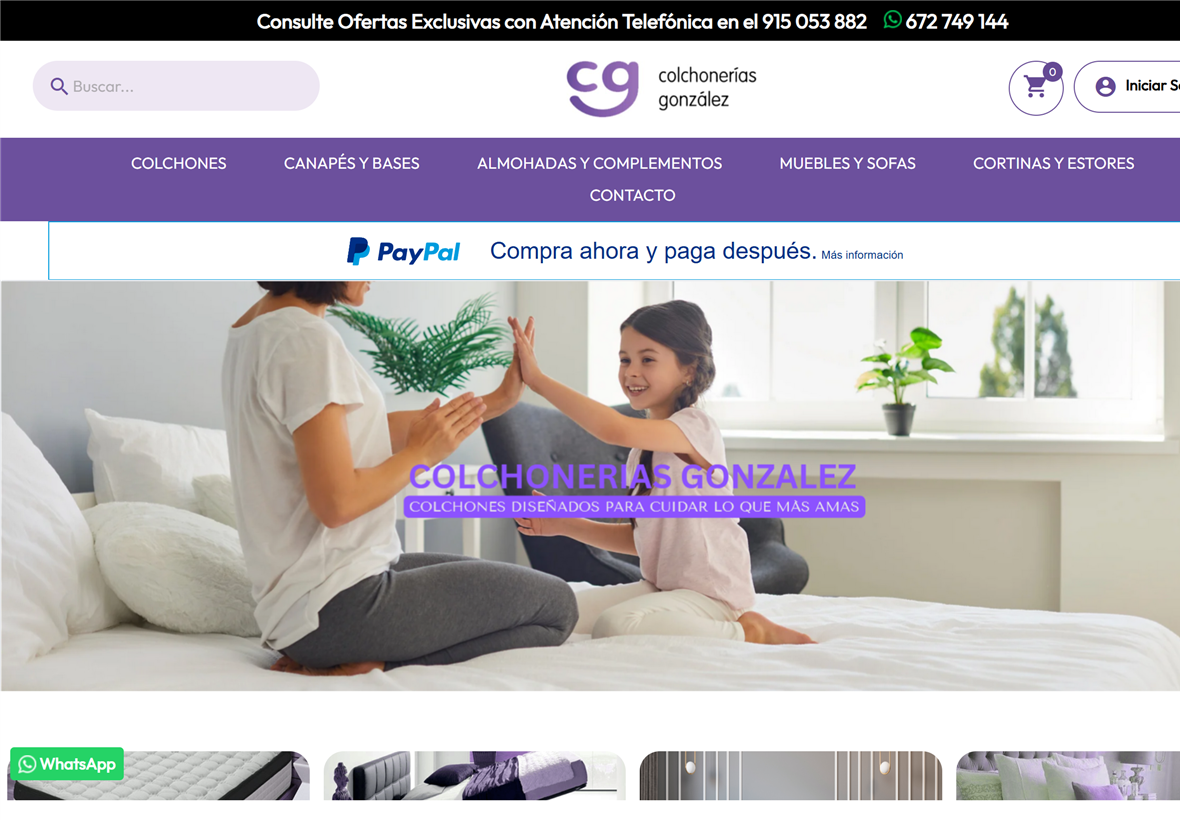
Live case: colchoneriasgonzalez.com — an online mattress shop in Madrid (PrestaShop 9, Hummingbird, custom CSS/templates, Plesk + nginx). The owner wanted to improve PageSpeed Insights PrestaShop: the homepage looked fine, but the mobile report was orange.
I tested the homepage with PageSpeed Insights / Lighthouse 13.4.1, Moto G Power emulation and Slow 4G. There is no magic module. There is a high Largest Contentful Paint, ~100 KiB of theme CSS, and a huge HTML document because of the mega-menu. This article is only that: the mobile lab on a live PrestaShop 9 shop.
What mobile PageSpeed Insights showed
The homepage “painted”. The lab did not. In the 21 August 2026 capture, Performance was 71. Hero-image LCP was 5.8 s (red). FCP 2.7 s. Speed Index 4.4 s. Accessibility 92. Best Practices 100. SEO 100. TBT 130 ms. CLS 0.
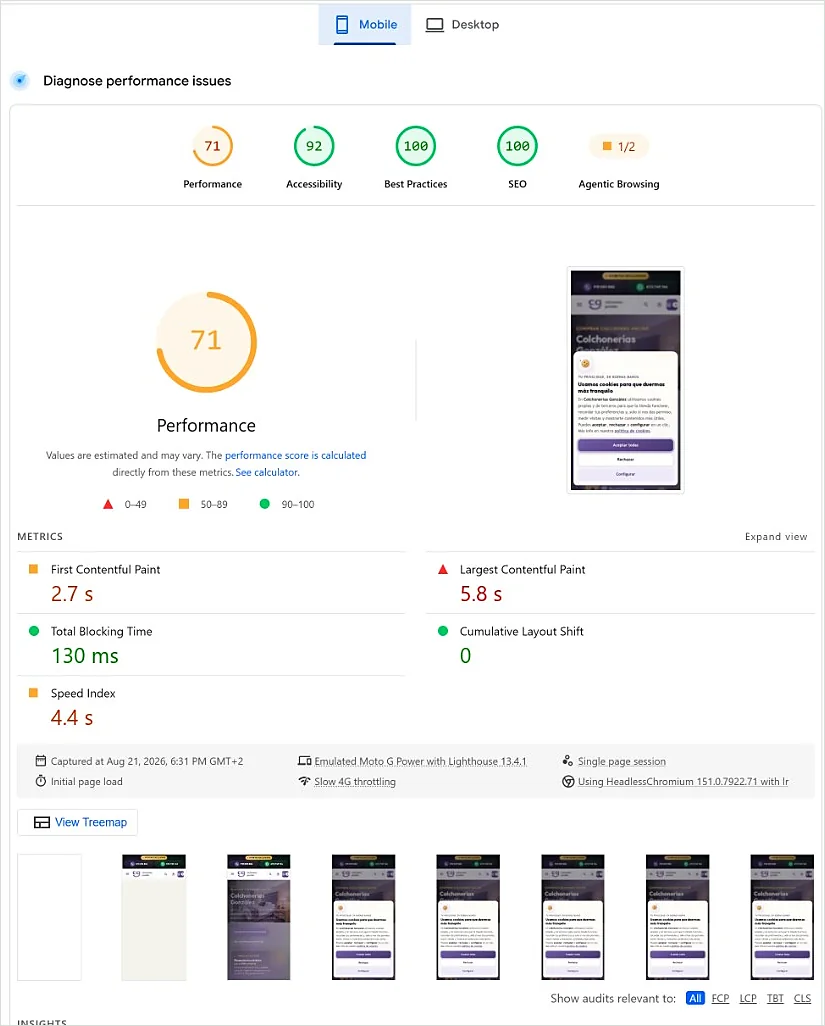
That is what a shop owner is looking at: an orange score and an LCP that will not drop.
Diagnosis: LCP was the hero, not a mystery
The Largest Contentful Paint on this homepage is the hero photo. On top of that, render-blocking CSS: the Hummingbird theme bundle (~100 KiB) plus custom.css. After the safe work, PageSpeed still reported ~1,030 ms of blocking CSS. That delay was accepted on purpose — see the trap below.
Homepage HTML is huge. Hummingbird’s mega-menu sits before the hero in the DOM. A speed module does not fix that. It is a PrestaShop + Hummingbird reality on a real catalogue. The Lighthouse PrestaShop lab (mobile, Slow 4G) makes it obvious: you parse menu and CSS first, then you paint the photo.
What we found
The hero image
A 1600 px JPEG hero is dead weight on a ~360 px-wide phone. The fix was surgical: WebP at the displayed size (hero-720.webp, ~18 KiB for ~721×480), srcset 640/720/960, fetchpriority="high", preload and decoding="sync". Logo also WebP with srcset. Footer logos: real width/height plus loading="lazy".
Theme CSS
Hummingbird ships a large stylesheet. PageSpeed says: defer it and save ~1,000 ms. On this shop, deferring it destroyed the score. It stays render-blocking, with a long nginx cache, and custom.css?v=… so old CSS is not served after a change.
Fonts
Self-hosted Manrope and Outfit (.woff2). No Google Fonts round-trip. @font-face merged into custom.css: one fewer CSS request.
The async-CSS trap
This is the lesson. I tried the “clever” tricks the report itself suggests. They looked like LCP wins. They wrecked the score. All reverted.
| Experiment | What happened |
|---|---|
Load theme CSS with media="print" + onload |
Performance 69. TBT ~960 ms. FOUC. Reverted. |
Hero first in the HTML (header after main) + theme CSS on window.load |
LCP 2.5 s, but CLS PrestaShop 0.237 and TBT 520 ms. Score 71. Reverted. |
Delay the hero <img> until window.load |
Lighthouse still counted the photo as LCP at ~3.3 s (late download). Useless. |
Lesson: on PrestaShop + Hummingbird, parsing ~100 KiB of theme CSS after first paint counts as Total Blocking Time. Moving the header after the hero makes LCP look better, then the header pops in and CLS kills the score. The stable setup is blocking CSS, header first in the HTML, TBT ~0, CLS 0, LCP ~3.4 s, score 90. Do not chase 100 by breaking the shop.
How to improve PageSpeed Insights PrestaShop without breaking the shop
The work was in the theme, the images and nginx. Files touched (no code walls):
themes/hummingbird/templates/_partials/head.tplthemes/hummingbird/templates/_partials/stylesheets.tplthemes/hummingbird/templates/_partials/cg/home.tplthemes/hummingbird/assets/css/custom.cssthemes/hummingbird/assets/img/cg/hero-*.webp- nginx vhost extra directives for long-cache static assets
Smarty compile cache cleared after each deploy.
- Hero at displayed size. WebP at the width that is shown,
srcset, preload andfetchpriority="high". Not a 1600 px JPEG. - Logo and footer. Logo as WebP with
srcset. Footer logos with width/height andloading="lazy". - Self-hosted fonts. Manrope + Outfit
.woff2insidecustom.css. One fewer request. - Static cache. nginx
expires 1y/immutablefor theme CSS, JS, fonts and images. Bump?v=after CSS changes. - Analytics.
gtagastype="text/plain"until cookie consent (cg_cookies). It does not run on first paint. - Theme CSS: blocking on purpose. No
media="print", no CSS onwindow.load, no header after the hero.
A later, small accessibility pass (trust-strip contrast, role="img" on star ratings, product-image alt fallback, footer H4 to <p>, nested <aside> to <div>). That is not the hero of this article; it is in the 26 August capture.
Result
Capture of 26 August 2026, 20:13 GMT+2. Same lab recipe: mobile, Slow 4G, Moto G Power, Lighthouse 13.4.1.
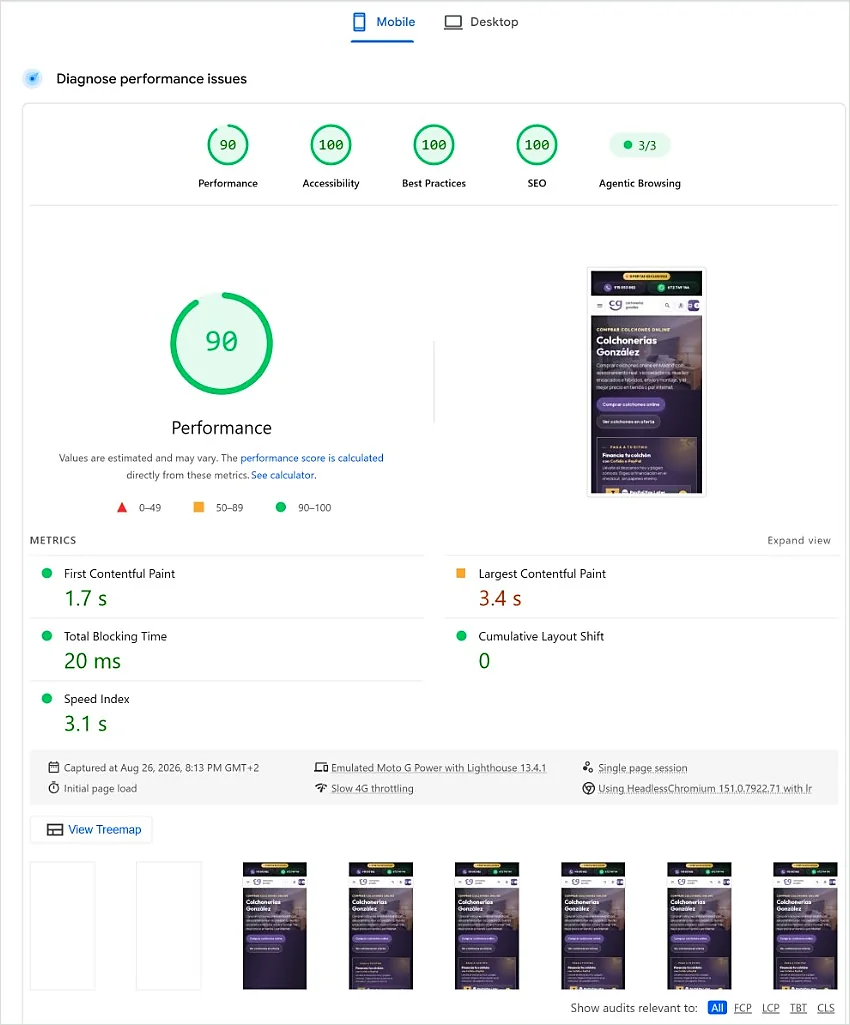
- Performance 90 (was ~71).
- FCP 1.7 s (was 2.7 s).
- LCP 3.4 s (was 5.8 s). Still orange. That is the remaining Core Web Vital.
- TBT 20 ms. CLS 0. Speed Index 3.1 s.
- Accessibility 100 in this capture (21 August was 92).
90 on a mobile lab is a strong score for a catalogue homepage. 100 on Slow 4G, with ~100 KiB of theme CSS and mega-menu HTML, is not realistic: it is marketing. Core Web Vitals PrestaShop on this home still have LCP as homework; the next safe work is not more async CSS. It is leaving the stable setup alone.
~1,030 ms of render-blocking CSS (theme + custom) remains. Accepted. Measured. Left in place.
Prevention checklist for shop owners
If you want to speed up PrestaShop without improvising in production:
- Always measure mobile PageSpeed Insights (Slow 4G), not desktop only.
- Do not async all theme CSS because the report asked. On Hummingbird that inflates TBT or CLS.
- Serve WebP at the displayed size. A 1600 px hero does not “add quality”: it delays LCP.
- Self-host fonts. Fewer round-trips.
- Cache static assets for 1 year and bump
?v=when CSS changes. - Clear Smarty compile cache after template deploys.
- Do not chase 100 at the cost of FOUC or a header that jumps.
A broader guide: how to improve PrestaShop speed. This case is the part the report does not tell you: what happens when you apply the async-CSS advice on Hummingbird.
Questions shop owners ask
Can you get 100 on mobile PrestaShop?
Not honestly on this homepage. 90 on Slow 4G, with ~100 KiB of theme CSS and a mega-menu, is a shop result. 100 in that lab is marketing, not this catalogue.
Why will LCP not drop below 2.5 s?
Because getting 2.5 s on this stack meant moving the header and delaying CSS. LCP improved and CLS went to 0.237: the score fell back to 71. The stable LCP is ~3.4 s, with CLS 0.
Does async CSS improve PageSpeed?
Not in this shop. media="print" + onload left Performance at 69 and TBT near 1 s. Blocking CSS, with TBT 20 ms and CLS 0, scores 90.
Do you need a speed module?
Not for this result. The work was templates, WebP, self-hosted fonts and nginx cache. A module does not shrink the mega-menu or resize the hero to the phone.
Conclusion
On Colchonerías González the orange mobile PageSpeed was not “the shop is broken”. It was a heavy hero, Hummingbird CSS that has to stay blocking, and a long HTML document. The report’s shortcuts made the score worse. The boring setup — CSS in the head, header first, image at displayed size — went from 71 to 90 and left CLS at 0.
Another live case, different stack: SEO spam and a malicious plugin on the iRepairPhone blog. Same method: facts, files, verification.
If your mobile PageSpeed Insights is orange and you want the same kind of diagnosis in production, I can review the homepage, theme CSS and images. Based in Madrid, remote across Spain.
Speed up PrestaShop · PrestaShop technical support · Request a quote · WhatsApp